EC-Council ECE Credits Reporting Guideline
Our courses align closely with EC-Council ECE requirements. If any completed course is not accepted for your ECE hours, we will issue a full refund—no questions asked. You can read more about our 100% Credit Acceptance Guarantee.
How to Report Earned ECE Credits
There are 3 basic steps to submit your earned EC-Council ECE credits.
1- Log in to your Aspen Account at EC-Council
Since you are an EC-Council-certified professional, you should have an account at eccouncil.org. Log on to your profile and navigate to the "My Courses" tab and click on "CPE Status".
2- Submit Different ECE Reports for Each Course
Each activity should have a different ECE report in the EC-Council CPE portal. For each course you will complete in our platform, you should submit a new CPE record.
Each course belongs to a different type of activity and earns a different number of ECE hours towards renewing your EC-Council certification. You can see the list of our courses and ECE hours for each course in the following table.
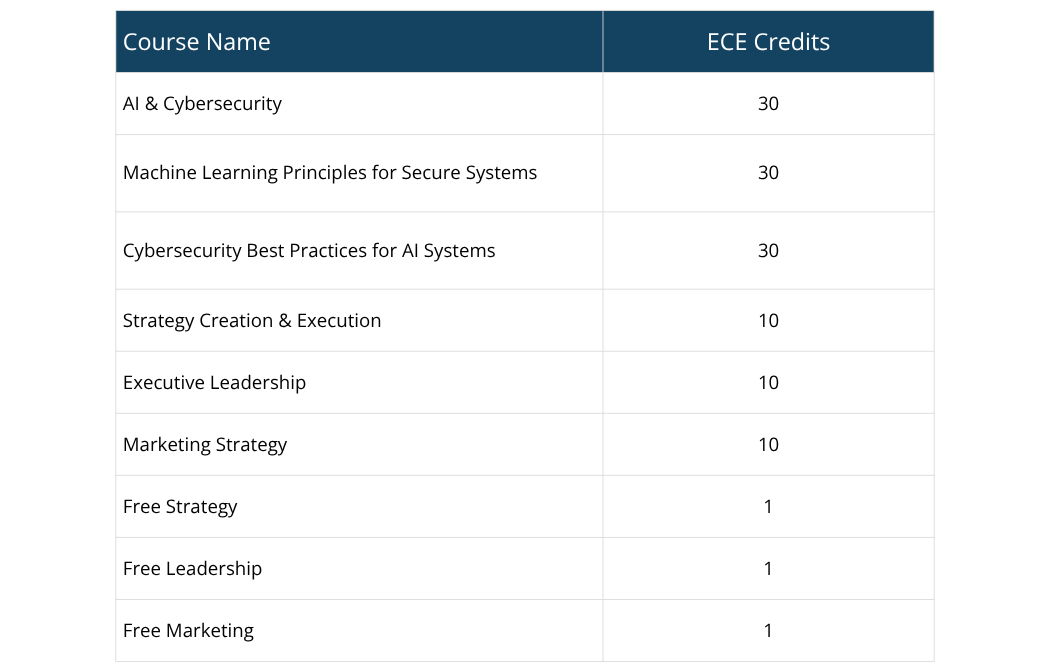
ECE Credit Details
You will be asked to type details of the online course you completed.
- Title/Description: Type as shown in the table above for each course you will complete on our platform.
- Sponsoring Organization/Presenter/Instructor: San Francisco Business School
- Start and End Dates of Course: Since our courses are self-paced and 100% online, you can submit the date you started and the date you finished, respectively.
- Qualifying Activity: Here, you will select the topics covered in the course. For instance, asset security, security and risk management, etc. Choose the relevant ones as they apply.
- Method of Delivery: Choose online or self-paced.
- Credits/Hours: Type the earned ECE hours for the relevant course you completed on our platform.
Once you have completed the details of EC-Council ECE credits reporting, you will see a review of your submission. After review, submit the ECE record.
3- Pay Annual Membership Fees & Renew Your EC-Council Certification
EC-Council requires an annual membership fee that each certification holder must pay to EC-Council to keep their certification status active.
Members only pay a single membership fee regardless of how many certifications they have earned.
If you paid your annual membership fees and completed the required CPE credits, you can renew your EC-Council certification.
What Should I Do If My ECE Credits Reporting is Audited?
San Francisco Business School courses are independent continuing education programs structured to meet Self-Reported ECE requirements under standard EC-Council recertification guidelines.
In case your submission is audited, please follow the instructions asked by EC-Council carefully. In case you are being asked for further details about the course (such as an enrollment letter, completion certificate, etc.), please email us at support@sanfranciscobs.com from the email address registered on our platform. We will send you the relevant documentation within 24 hours, if not sooner.
You can read more about EC-Council ECE Credits and CEH Certification Renewal in our blog.