CompTIA CEU Reporting Guideline
Our courses align closely with CompTIA CEU requirements. If any completed course is not accepted for your CEU hours, we will issue a full refund—no questions asked. You can read more about our 100% Credit Acceptance Guarantee.
How to Report Earned CEU Credits
There are 3 basic steps to submit your earned CompTIA CEU credits.
1- Log in to your CompTIA Account
Since you are a CompTIA-certified professional, you should have an account at CompTIA.org. Log on to your profile and navigate to the "Manage Certifications" header.
Go to the "My Certifications" area and select the "Continuing Education" menu and click on "Add CEUs".
2- Submit Different CEU Reports for Each Course
Each activity should have a different CEU report in the CompTIA account. For each course you will complete in our platform, you should submit a new CEU record.
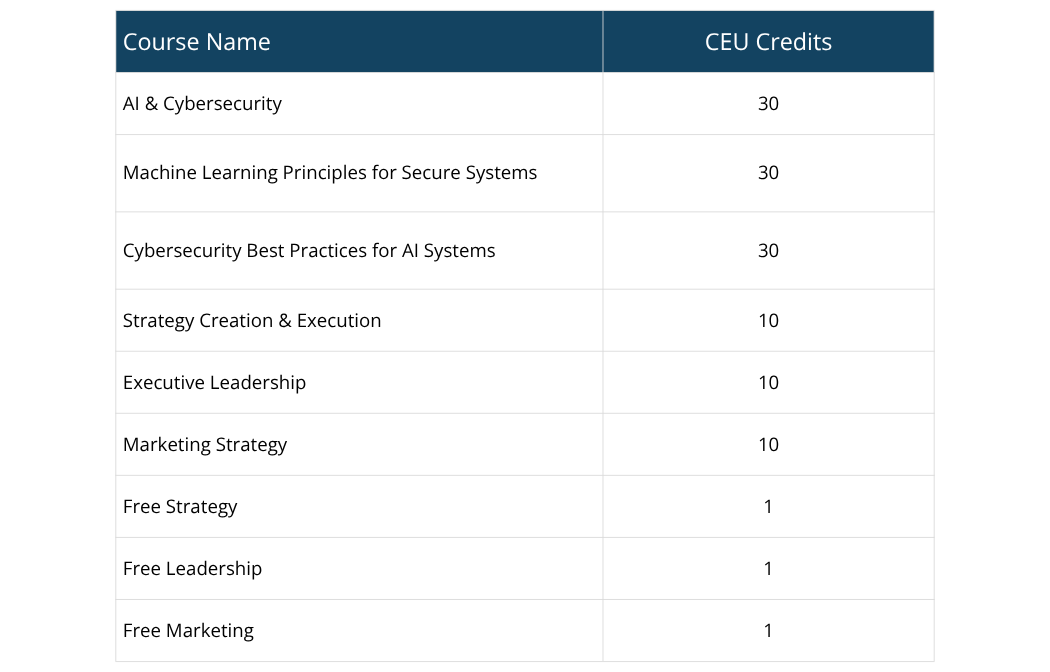
Each course belongs to a different type of activity and earns a different number of CEU hours towards renewing your CompTIA certification. You can see the list of our courses and CEU hours for each course in the following table.
CEU Details
You will be asked to type details of the online course you completed.
- Activity Group: Select the "Completed a Training Course" option.
- Training Provider: San Francisco Business School
- Number of CEUs: Type the earned CEU credit hours for the relevant course you completed on our platform.
- Documentation Language: English
- Document to Upload: You can upload the certificate of completion for the course you completed on our platform.
- Start and End Dates of Course: Since our courses are self-paced and 100% online, you can submit the date you started and the date you finished, respectively.
- Summary/Course Description: You can navigate to the course sales page and copy the summary of the course description.
- For instance, for the AI & Cybersecurity Course, you can type "Master AI security and protect your data. Learn how to defend against prompt injection, secure LLM applications, and implement an end-to-end Secure AI System Development Guideline."
Once you have completed the details of CompTIA CEU reporting, you will see a review of your submission. After review, submit the CEU record.
After submitting, you’ll see a confirmation message stating your CEUs have been successfully submitted. Once submitted, your CEUs are automatically accepted and applied toward your total.
3- Pay Annual CE Fees & Renew Your CompTIA Certification
CompTIA requires an annual continuing education (CE) fee that each certification holder must pay to CompTIA to keep their certification status active.
CompTIA members pay a single AMF, even if they hold several CompTIA certifications. The annual CE fee differs for each certification track.
- For A+ and Data+ certification holders, the annual CE fee is 25 USD.
- For Data+, DataSys+, Network+, Security+, Linux+, Cloud+, PenTest+, CySA+, CASP+ certification holders, the annual fee is 50 USD
If you paid your annual CE fees and completed the required CEU credits, you can renew your CompTIA certification.
What Should I Do If My CEU Reporting is Audited?
Submission of CEU credits and automatic approval by CompTIA does not guarantee exemption from audits.
San Francisco Business School courses are independent continuing education programs structured to meet Self-Reported CEU requirements under standard CompTIA recertification guidelines.
In case your submission is audited, please follow the instructions asked by CompTIA carefully. In case you are being asked for further details about the course (such as an enrollment letter, completion certificate, etc.), please email us at support@sanfranciscobs.com from the email address registered on our platform. We will send you the relevant documentation within 24 hours, if not sooner.
You can read more about CompTIA Continuing Education and CompTIA Certification Renewal in our blog.